
Graphs and Networks#
A graph is a collection of nodes \(N\) and edges \(E \subset N\times N\). Depending on the interpretation, one might consider the edges directed \((a, b) \not\equiv (b, a)\) (sometimes called a directed graph or digraph) or simply connections \((a, b) \equiv (b, a)\). Edges may also have weights \(w\) associated with them, corresponding, e.g., to the length of the edge or time it takes to travel.
Here we will consider weighed digraphs where the weight of each edge represents the distance or travel time for the edge..
Representing Graphs#
There are several ways one can represent a graph. Each has some advantages and disadvantages:
As sets of nodes, edges and weights. This is very simple and economical, but algorithms on the graph can be expensive.
As a collection of nodes, each of which link to other nodes. This is not quite as compact or simple, but allows one to directly traverse the graph. Local operations are efficient.
As an adjacency matrix \(\mat{A}\). This is generally not as economical (though sparse representations are not bad), but allows for some very nice analysis. For example, if the entries in the matrix tell you how many paths connect each pair of nodes, then raising the matrix to a power \(\mat{A}^p\) give you the adjacency matrix for a path of length \(p\). If you include the diagonals – i.e. each node is connected to itself – then this can be used to find all the connected components.
import graphviz
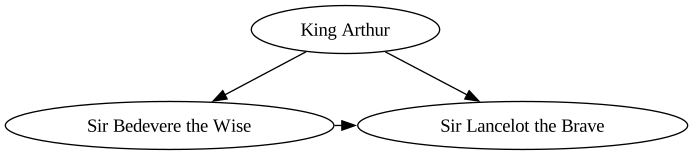
dot = graphviz.Digraph(comment='The Round Table')
dot.node('A', 'King Arthur')  # doctest: +NO_EXE
dot.node('B', 'Sir Bedevere the Wise')
dot.node('L', 'Sir Lancelot the Brave')
dot.edges(['AB', 'AL'])
dot.edge('B', 'L', constraint='false')
dot
[D 08:53:55 graphviz._tools] deprecate positional args: graphviz.backend.piping.pipe(['renderer', 'formatter', 'neato_no_op', 'quiet'])
[D 08:53:55 graphviz._tools] deprecate positional args: graphviz.backend.rendering.render(['renderer', 'formatter', 'neato_no_op', 'quiet'])
[D 08:53:55 graphviz._tools] deprecate positional args: graphviz.backend.unflattening.unflatten(['stagger', 'fanout', 'chain', 'encoding'])
[D 08:53:55 graphviz._tools] deprecate positional args: graphviz.backend.viewing.view(['quiet'])
[D 08:53:55 graphviz._tools] deprecate positional args: graphviz.quoting.quote(['is_html_string', 'is_valid_id', 'dot_keywords', 'endswith_odd_number_of_backslashes', 'escape_unescaped_quotes'])
[D 08:53:55 graphviz._tools] deprecate positional args: graphviz.quoting.a_list(['kwargs', 'attributes'])
[D 08:53:55 graphviz._tools] deprecate positional args: graphviz.quoting.attr_list(['kwargs', 'attributes'])
[D 08:53:55 graphviz._tools] deprecate positional args: graphviz.dot.Dot.clear(['self', 'keep_attrs'])
[D 08:53:55 graphviz._tools] deprecate positional args: graphviz.dot.Dot.__iter__(['self', 'subgraph'])
[D 08:53:55 graphviz._tools] deprecate positional args: graphviz.dot.Dot.node(['label', '_attributes'])
[D 08:53:55 graphviz._tools] deprecate positional args: graphviz.dot.Dot.edge(['label', '_attributes'])
[D 08:53:55 graphviz._tools] deprecate positional args: graphviz.dot.Dot.attr(['kw', '_attributes'])
[D 08:53:55 graphviz._tools] deprecate positional args: graphviz.dot.Dot.subgraph(['graph', 'name', 'comment', 'graph_attr', 'node_attr', 'edge_attr', 'body'])
[D 08:53:55 graphviz._tools] deprecate positional args: graphviz.piping.Pipe._pipe_legacy(['format', 'renderer', 'formatter', 'neato_no_op', 'quiet'])
[D 08:53:55 graphviz._tools] deprecate positional args: graphviz.saving.Save.save(['filename', 'directory'])
[D 08:53:55 graphviz._tools] deprecate positional args: graphviz.rendering.Render.render(['filename', 'directory', 'view', 'cleanup', 'format', 'renderer', 'formatter', 'neato_no_op', 'quiet', 'quiet_view'])
[D 08:53:55 graphviz._tools] deprecate positional args: graphviz.rendering.Render.view(['filename', 'directory', 'cleanup', 'quiet', 'quiet_view'])
[D 08:53:55 graphviz._tools] deprecate positional args: graphviz.unflattening.Unflatten.unflatten(['self', 'stagger', 'fanout', 'chain'])
[D 08:53:55 graphviz._tools] deprecate positional args: graphviz.graphs.BaseGraph.__init__(['name', 'comment', 'filename', 'directory', 'format', 'engine', 'encoding', 'graph_attr', 'node_attr', 'edge_attr', 'body', 'strict'])
[D 08:53:55 graphviz._tools] deprecate positional args: graphviz.sources.Source.from_file(['filename', 'directory', 'format', 'engine', 'encoding', 'renderer', 'formatter'])
[D 08:53:55 graphviz._tools] deprecate positional args: graphviz.sources.Source.__init__(['source', 'filename', 'directory', 'format', 'engine', 'encoding'])
[D 08:53:55 graphviz._tools] deprecate positional args: graphviz.sources.Source.save(['filename', 'directory'])
[D 08:53:55 graphviz.backend.execute] run [PosixPath('dot'), '-Kdot', '-Tsvg']
Graph Algorithms#
Given a graph, we might like to ask questions like the following:
Can we get from node \(a\) to node \(b\)?
If so, what is the shortest path from \(a\) to \(b\)?
How many connected components are there in the graph?
These are “easy” problems in the sense that they have efficient solutions using e.g. Dijkstra’s algorithm.
Harder questions include:
Is there a Hamiltonian path? I.e., a path that visits each vertex exactly once. This is an NP-complete problem.
What is the shortest cycle that visits each vertex exactly once? This is the famous Travelling salesman problem. This is an NP-hard problem.