
Class Log
Contents
Class Log
Fri 29 Oct 2021
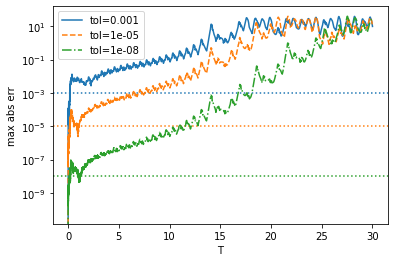
In class we considered the numerical error accumulation in a chaotic system by evolving forward and backward in time. This gives something related to the Loschmidt echo.
Fri 24 Sept 2021
Plan:
Tell students to use a generated CC number (CITI has one) so they can use the shared runners on GitLab. (I tried it with a $1 limit and it was fine.)
Review error estimates, then start demonstrating Euler’s method. Maybe do this with the Lorenz system?
Discuss Stiff equations? Maybe construct an example.
%pylab inline --no-import-all
from scipy.integrate import solve_ivp

sigma = 10.0
beta = 8.0/3
rho = 28.0

q0 = (1.0, 1.0, 1.0)
t0 = 0.0

def fun(t, q):
   """Lorenz equations."""
   x, y, z = q
   return (sigma * (y-x), x * (rho - z) - y, x * y - beta * z)


T = 30.0
tols = [1e-3, 1e-5, 1e-8, 1e-12]
ress = [solve_ivp(fun, t_span=(0, T), y0=q0, atol=_tol, rtol=_tol/10,
                  dense_output=True)
        for _tol in tols]

fig, ax = plt.subplots()

res_best = ress[-1]
ts = res_best.t
qs = res_best.y

line_styles = ['-', '--', '-.']
for n, tol in enumerate(tols[:-1]):
    res = ress[n]
    err = abs(res.sol(ts) - qs).max(axis=0)
    l, = ax.semilogy(ts, err, ls=line_styles[n], label=f"tol={tol}")
    ax.axhline([tol], c=l.get_c(), ls=':')
ax.legend()
ax.set(xlabel='T', ylabel='max abs err');
%pylab is deprecated, use %matplotlib inline and import the required libraries.
Populating the interactive namespace from numpy and matplotlib
Wed 22 Sept 2021
We started working with the simple 1D problem posed on Monday, but stated without the solution.
%pylab inline --no-import-all
from scipy.integrate import solve_ivp

# Initial condition
y0 = 1.0

def fun(t, y):
    return -t*y

t0 = 0.0
tf = 3.0
res = solve_ivp(
    fun, t_span=(t0, tf),
    y0=[y0],  # Gotcha 1:
    t_eval=np.linspace(t0, tf, 100), # Gotcha 3:
    max_step=0.1,
)

fig, ax = plt.subplots()

ts = res.t
ys = res.y[0]  # Gotcha 2:

ax.plot(ts, ys)
ax.set(xlabel='t', ylabel='y');
%pylab is deprecated, use %matplotlib inline and import the required libraries.
Populating the interactive namespace from numpy and matplotlib
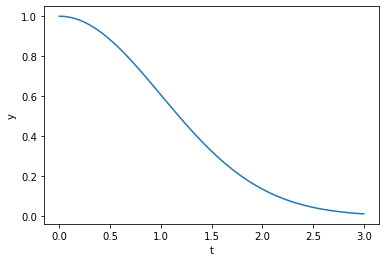
There are still a few “Gotcha”s here which need to be carefully addressed:
Reading the
solve_ivpdocs carefully, one sees that the parametery0has the following type:y0 : array_like, shape (n,)
The following error is obtained:
>>> res = solve_ivp(fun, t_span=(t0, tf), y0=y0)
...
ValueError: `y0` must be 1-dimensional.
One needs to explain that floats are 0-dimensional, so we need to put the initial condition into a list or an array.
Similarly, in the results,
res.y.shape == (1, Nt)becausesolve_ivpis setup to deal with a vector of parameters. Thus, we need to extract the zero-th element here. This was most easily explained in terms of the previous problem wherex = res.y[0],y = res.y[1], etc.This issue was typically encountered if students tried:
...
>>> ax.plot(res.t, res.y)
...
ValueError: x and y must have same first dimension, but have shapes (100,) and (1, 100)
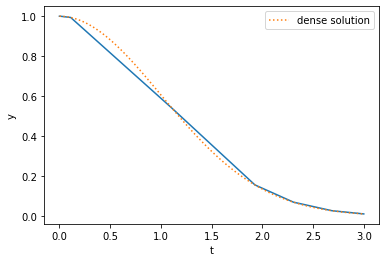
The third “Gotcha” is that if you just use the default arguments, you get a very low-resolution plot (shown below). The reason is that the solver is adaptive, only evaluating the function where needed. To get more points, we need to either specify
min_steport_eval. I discussed both.I mentioned a third option shown below of using
dense_output=True, but did not show this in class:
res = solve_ivp(fun, t_span=(t0, tf), y0=[y0], dense_output=True)
plt.plot(res.t, res.y[0])

ts = np.linspace(t0, tf, 100)
plt.plot(ts, res.sol(ts)[0], ':', label='dense solution')
plt.gca().set(xlabel='t', ylabel='y');
plt.legend()
<matplotlib.legend.Legend at 0x7f5a31c30bb0>
We then solved the IVP and looked at the errors:
res = solve_ivp(fun, t_span=(t0, tf), y0=[y0], rtol=1e-5, atol=1e-5)

ts = res.t
ys = res.y[0]
ys_exact = y0 * np.exp(-(ts**2 - t0**2)/2)
abs_err = abs(ys_exact - ys)
rel_err = abs(abs_err/ys_exact)

fig, ax = plt.subplots()
ax.semilogy(ts, abs_err, label='abs_err')
ax.semilogy(ts, rel_err, label='rel_err')
ax.legend()
ax.set(xlabel='t', ylabel='err');
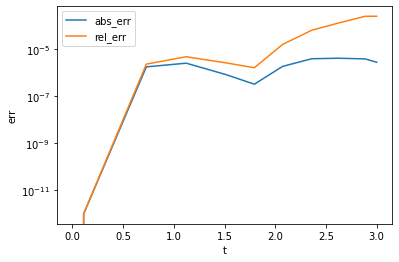
We then explored changing the tolerances a bit and discussed absolute vs. relative errors. I explained that if you scale your problem well, then these are roughly the same, but that usually the relative tolerance is more important (significant digits). However, when your solution is zero, your relative error will go through the roof, so you need to fallback on the absolute error.
Students asked why this plot looks so jumpy. I explained that if the solver is doing what it claims, then the solution will oscillate about the true solution within the specified errors, but that how it does this is up to the solver details.
Mon 20 Sept 2021
Today we worked on setting up ODE’s for use with solve_ivp. We started with the
problem of solving for the motion of a projectile in a constant downward gravitational
field, allowing for drag:
%pylab inline --no-import-all
from scipy.integrate import solve_ivp

m = 1.0        # Mass
g = 9.81       # Acceleration due to gravity
lam = 0.5      # Drag
h0 = 10.0      # Initial height
v0 = 10.0      # Initial velocity
theta = 45.0/180*np.pi  # Initial angle

# Initial condition
q0 = [
    0.0, 0.0, h0,  # x0, y0, z0
    v0*np.cos(theta), 0, v0*np.sin(theta),  # vx0, vy0, vz0
]

def fun(t, q):
    x, y, z, vx, vy, vz = q
    ax = -lam*vx / m
    ay = -lam*vy / m
    az = -lam*vz / m - g
    return [vx, vy, vz, ax, ay, az]

t0 = 0.0
tf = 3.0
res = solve_ivp(fun, t_span=(t0, tf), y0=q0, max_step=0.1)

fig, ax = plt.subplots()

ts = res.t
xs, ys, zs, vxs, vys, vzs = res.y
ax.plot(xs, zs)
ax.set(xlabel='x', ylabel='z', aspect=1);
%pylab is deprecated, use %matplotlib inline and import the required libraries.
Populating the interactive namespace from numpy and matplotlib
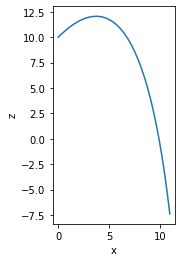
The following issues were encountered:
Some students were confused about how to write
fun(t, q), especially about whether or not the initial conditionsq0should play a role. I discussed howfun(t, q)has access toqwhich allows you to forget aboutq0etc. and focus on the current time. (However, there is the issue ofm,g, etc. which maybe should be passed as default arguments?)
To try to simplify this, I suggested a simpler problem inspired by a known solution:
This helped some students, but confused others because we switched gears mid-class. Here some students became fixated on the solution \(e^{-t^2/2}\) and were not sure how this should enter their code. In future, just specify the IVP and then solve it later.
Wed 8 Sept 2021
Today we had the class fork the main repo so they could submit their work. The steps were:
Create a personal GitLab account.
Open private CoCalc account (in this case, created through the class course. Instructors like Matt Duez need to create a private account).
Open a terminal on CoCalc, and generate an ssh key if needed with
ssh-keygen -t ed25519:~$ ls ~/.ssh/ # See if keys exist authorized_keys known_hosts $ ssh-keygen -t ed25519 # Generate new key if needed Generating public/private ed25519 key pair. Enter file in which to save the key (/home/user/.ssh/id_ed25519): Enter passphrase (empty for no passphrase): Enter same passphrase again: Your identification has been saved in /home/user/.ssh/id_ed25519 Your public key has been saved in /home/user/.ssh/id_ed25519_1.pub The key fingerprint is: ... ~$ ls ~/.ssh/ # Now keys exist authorized_keys id_ed25519 id_ed25519.pub known_hosts
Start an ssh agent running
bashand authenticate withssh-add:~$ ssh-agent bash ~$ ssh-add Enter passphrase for /home/user/.ssh/id_ed25519: Identity added: /home/user/.ssh/id_ed25519 (user@project-...)
Potential failure
Students may have created a key earlier but forgot their password. In this case, they should delete the keys and regenerate them:
~$ ssh-keygen -t ed25519
Generating public/private ed25519 key pair.
Enter file in which to save the key (/home/user/.ssh/id_ed25519):
/home/user/.ssh/id_ed25519 already exists.
Overwrite (y/n)? y
Enter passphrase (empty for no passphrase):
Enter same passphrase again:
Your identification has been saved in /home/user/.ssh/id_ed25519
Your public key has been saved in /home/user/.ssh/id_ed25519.pub
The key fingerprint is:
...
Copy the public key and add it to the student’s GitLab project (top right Preferences > SSH Keys).
~$ cat ~/.ssh/id_ed25519.pub
ssh-ed25519 AAAA...
Open the Official Course Repository on GitLab and create a Fork (top right) in the student’s personal namespace with Private visibility level. Have students alter the Project description so as to differentiate this from the Official Course Repository.
In this Fork, copy the Clone > Clone with SSH link i.e.
git@gitlab.com:mforbes/physics-581-physics-inspired-computation.git.Clone the private fork on CoCalc after first moving or removing any previously cloned repository:
~$ cd ~     # Go to home directory
~$ ls       # See if there are any previous clones
2021-09-08-131459.term  physics-581-physics-inspired-computation
~$ mv physics-581-physics-inspired-computation physics-581-physics-inspired-computation_old
~$ git clone git@gitlab.com:mforbes/physics-581-physics-inspired-computation.git
Cloning into 'physics-581-physics-inspired-computation'...
...
Potential failure
This needs to be done in the terminal where
ssh-agent bashandssh-addwere run, otherwise the clone will fail:~$ git clone git@gitlab.com:mforbes/physics-581-physics-inspired-computation.git Cloning into 'physics-581-physics-inspired-computation'... git@gitlab.com: Permission denied (publickey,keyboard-interactive). fatal: Could not read from remote repository. Please make sure you have the correct access rights and the repository exists.
Perhaps we should add something like this to
~/.bash_aliases:... # if we can't find an agent, start one, and restart the script. if [ -z "$SSH_AUTH_SOCK" ] ; then exec ssh-agent bash -c "ssh-add ; $0" exit fi ...
This would ensure an agent is always running, requiring only
ssh-add.After cloning, the private fork should be the remote called
origin. Add the Official Course Repository as a remote calledupstreamwithgit remote add upstream git@gitlab.com:wsu-courses/physics-581-physics-inspired-computation.git:~$ cd ~/physics-581-physics-inspired-computation ~/physics-581-physics-inspired-computation$ git remote -v origin git@gitlab.com:mforbes/physics-581-physics-inspired-computation.git (fetch) origin git@gitlab.com:mforbes/physics-581-physics-inspired-computation.git (push) ~/physics-581-physics-inspired-computation$ git remote add upstream git@gitlab.com:wsu-courses/physics-581-physics-inspired-computation.git ~/physics-581-physics-inspired-computation$ git remote -v origin git@gitlab.com:mforbes/physics-581-physics-inspired-computation.git (fetch) origin git@gitlab.com:mforbes/physics-581-physics-inspired-computation.git (push) upstream git@gitlab.com:wsu-courses/physics-581-physics-inspired-computation.git (fetch) upstream git@gitlab.com:wsu-courses/physics-581-physics-inspired-computation.git (push)
Now students can
git pullandgit pushto interact with their private repo, andgit pull upstream mainto get updates from the Official Course Repository.Pull any changes from the Official Course Repository, and then run
make init:~/physics-581-physics-inspired-computation$ git pull upstream main $ git pull upstream main From gitlab.com:wsu-courses/physics-581-physics-inspired-computation * branch main -> FETCH_HEAD Already up to date. ~/physics-581-physics-inspired-computation$ make init git clone git@gitlab.com:wsu-courses/physics-581-physics-inspired-computation_resources.git _ext/Resources Cloning into '_ext/Resources'... ...
Crash and burn failure
Many students ran into a major issue where
make initfailed due to an error introduced into the laatest setuptools two days ago:To fix this for now, we pin the version of
setuptools<58.0.2|>=59inanaconda-project.yaml.Once this is done, when a new terminal is started, it should be using the
phys-581-2021kernel:(phys-581-2021) ~$
This kernel should also be available in Jupyter Notebooks in the list of Kernels.
(Incomplete) Specify the [Git] username and email so that students can commit by specifying the following in their CoCalc project **Settings > Custom environment variables (The
LC_EDITORneed not be specified unless students prefervito the defaultnano.):{ "LC_GIT_USERNAME": "Michael McNeil Forbes", "LC_GIT_USEREMAIL": "m.forbes@wsu.edu", "LC_EDITOR": "vi", }
The project needs to be restarted for these to take effect. After restarting, [Git] should see these:
~$ git

````{admonition} Potential failure
If this is not done properly, students may get an error like the following:

```console
(phys-581-2021) ~/physics-581-physics-inspired-computation$ git commit

*** Please tell me who you are.

Run

  git config --global user.email "you@example.com"
  git config --global user.name "Your Name"

to set your account's default identity.
Omit --global to set the identity only in this repository.

fatal: empty ident name (for <user@fa57a33d76fc>) not allowed
Our current
~/.bash_aliasesfile usesLC_GIT_USERNAMEandLC_GIT_USERMAILto set the following:export GIT_AUTHOR_NAME="${LC_GIT_USERNAME}" export GIT_AUTHOR_EMAIL="${LC_GIT_USEREMAIL}" export GIT_COMMITTER_NAME="${LC_GIT_USERNAME}" export GIT_COMMITTER_EMAIL="${LC_GIT_USEREMAIL}"
These should only be set if the variables are defined, otherwise, they will have empty values cause any customization in
~/.gitconfigto be ignored. This will be fixed in the next version ofmmf_setup.